Recently, I started learning Beej’s Guide to Network Concepts but found that the examples were written in Python. However, I’m an engineer who loves Go. So, why not adapt it to Go? In this article, I adapt the chapter “5 Project: HTTP Client and Server” to the Go language. This will be useful for anyone learning network concepts who wants to practice in Go.
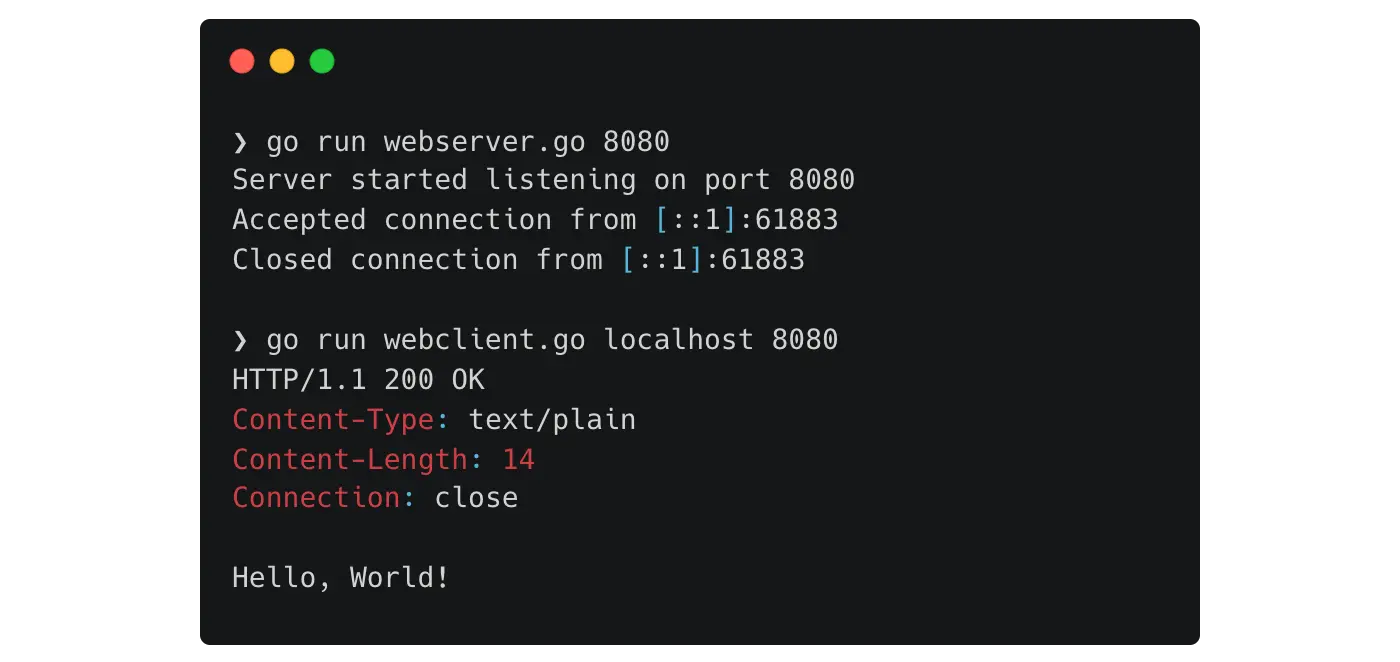
Most of the text is copied from the original article . Only the examples have been changed to be Go-specific.
5 Project: HTTP Client and Server
We’re going to write a sockets program that can download files from a web server! This is going to be our “web client”. This will work with almost any web server out there, if we code it right.
And as if that’s not enough, we’re going to follow it up by writing a simple web server! This program will be able to handle requests from the web client we write… or indeed any other web client such as Chrome or Firefox!
These programs are going to speak a protocol you have probably heard of: HTTP, the HyperText Transport Protocol.
And because they speak HTTP, and web browsers like Chrome speak HTTP, they should be able to communicate!
5.1 Restrictions
In order to better understand the sockets API at a lower level, this project may not use any of the following:
- Anything from the
net/httppackage. - Any third-party HTTP client/server libraries.
You should use only:
net(fornet.Dial,net.Listen,net.Conn, etc.)bufio,io,os,fmt,bytes, etc., as needed.
The idea is: after you finish this, Go’s net/http will look like a thin, friendly layer over what you just did yourself.
5.2 Go Strings and Byte Slices
In Go, sockets send and receive []byte, but most of your text is in string.
You’ll convert back and forth:
s := "Hello, world!" // string
b := []byte(s)       // ready to send over the socket

// And the reverse:
s2 := string(b)      // convert []byte to string
HTTP on the “classic web” often uses ISO-8859-1 in old docs, but for this project you can assume simple ASCII-ish/UTF-8-safe characters as long as your payload doesn’t contain weird Unicode.
5.3 HTTP Summary
HTTP operates on the concept of requests and responses. The client requests a web page, the server responds by sending it back.
A simple HTTP request from a client looks like this:
GET / HTTP/1.1
Host: example.com
Connection: close
That shows the request header which consists of the request method, path, and protocol on the first line, followed by any number of header fields. There is a blank line at the end of the header.
This request is saying “Get the root web page from the server example.com and I’m going to close the connection as soon as I get your response.”
Ends-of-line are delimited by a Carriage Return/Linefeed combination. In Go or C, you write a CRLF like this:
"\r\n"
If you were requesting a specific file, it would be on that first line, for example:
GET /path/to/file.html HTTP/1.1
(And if there were a payload to go with this header, it would go just after the blank line.
There would also be a Content-Length header giving the length of the payload in bytes. We don’t have to worry about this for this project.)
A simple HTTP response from a server looks like:
HTTP/1.1 200 OK
Content-Type: text/plain
Content-Length: 6
Connection: close

Hello!
This response says, “Your request succeeded and here’s a response that’s 6 bytes of plain text. Also, I’m going to close the connection right after I send this to you. And the response payload is ‘Hello!’.”
Notice that the Content-Length is set to the size of the payload: 6 bytes for Hello!.
Another common Content-Type is text/html when the payload has HTML data in it.
5.4 The Client
The client should be named webclient.go.
You can write the client before the server first and then test it on a real, existing webserver. No need to write both the client and server before you test this.
The goal with the client is that you can run it from the command line, like so:
$ go run webclient.go example.com
for output like this:
HTTP/1.1 200 OK
Age: 586480
Cache-Control: max-age=604800
Content-Type: text/html; charset=UTF-8
Date: Thu, 22 Sep 2022 22:20:41 GMT
Etag: "3147526947+ident"
Expires: Thu, 29 Sep 2022 22:20:41 GMT
Last-Modified: Thu, 17 Oct 2019 07:18:26 GMT
Server: ECS (sec/96EE)
Vary: Accept-Encoding
X-Cache: HIT
Content-Length: 1256
Connection: close

<!doctype html>
<html>
<head>
    <title>Example Domain</title>
    ...
(Output truncated, but it would show the rest of the HTML for the site.)
Notice how the first part of the output is the HTTP response with all those fields from the server, and then there’s a blank line, and everything following the blank line is the response payload.
ALSO: you need to be able specify a port number to connect to on the command line. This defaults to port 80 if not specified. So you could connect to a webserver on a different port like so:
$ go run webclient.go example.com 8088
Which would get you to port 8088.
First things first, you need the
net
package in Go, so
import "net"
at the top. Then you have access to the functionality.
Here are some Go-specifics:
Use
net.Dialto make a new socket, perform a DNS lookup, and connect the new socket to a destination. This function returnsconnas a socket abstraction.Build and send the HTTP request. You can use the simple HTTP request shown above. Don’t forget the blank line at the end of the header, and don’t forget to end all lines with “\r\n”!
Use
conn.Write()orio.WriteString(conn, req)for this.Receive the web response with
conn.Readmethod. It will return some bytes in response. You’ll have to call it several times in a loop to get all the data from bigger sites.It will return the
io.EOFerror when the server closes the connection and there’s no more data to read.Use a loop with a buffer to read the entire response:
buf := make([]byte, 4096)
for {
	n, err := conn.Read(buf)
	if n > 0 {
		os.Stdout.Write(buf[:n])
	}
	if err != nil {
		// handle EOF / error
		break
	}
}
Print the raw response bytes to stdout (headers + body).
Call
conn.Close()on your connection when you’re done.
Test the client by hitting some websites with it:
$ go run webclient.go example.com
$ go run webclient.go google.com
$ go run webclient.go oregonstate.edu
5.5 The Server
The server should be named webserver.go.
You’ll launch the webserver from the command line like so:
$ go run webserver.go
and that should start it listening on port 28333.
ALSO code it so we could also specify an optional port number like this:
$ go run webserver.go 12399
The server is going to going to run forever, handling incoming requests. (Forever means “until you hit CTRL-C”.)
And it’s only going to send back one thing no matter what the request is. Have it send back the simple server response, shown above.
So it’s not a very full-featured webserver. But it’s the start of one!
Here are some Go specifics:
Create the socket, bind the socket and listen with
net.Listen.Accept new connections with
conn.Acceptin a loop:for { conn, err := ln.Accept() if err != nil { // log the error and continue continue } go handleConn(conn) }Receive the request from the client. Use
bufio.NewReader(conn). Read until you detect the end of the header:\r\n\r\n. Example approach:r := bufio.NewReader(conn) var buf bytes.Buffer for { line, err := r.ReadBytes('\n') // reads up to '\n' if err != nil { // handle EOF / error return } buf.Write(line) if bytes.HasSuffix(buf.Bytes(), []byte("\r\n\r\n")) { break } } // buf.Bytes() now contains the full HTTP request headerYou cannot just read until EOF here, because the client expects a response without closing the connection first.
Send a simple HTTP response:
body := "Hello!\n"
resp := "HTTP/1.1 200 OK\r\n" +
	"Content-Type: text/plain\r\n" +
	fmt.Sprintf("Content-Length: %d\r\n", len(body)) +
	"Connection: close\r\n" +
	"\r\n" +
	body

conn.Write([]byte(resp))
Close a connection.
Now run the web server in one window and run the client in another, and see if it connects!
Once it’s working with webclient.go, try it with a web browser!
Run the server on an unused port (choose a big one at random):
$ go run webserver.go 20123
Go to the URL http://localhost:20123/ to view the page. (localhost is the name of “this computer”.)
If it works, great!
Did you notice that if you use a web browser to connect to your server, the browser actually makes two connections? Dig into it and see if you can figure out why!
5.6 Hints and Help
5.6.1 Address Already In Use
If your server crashes and then you start getting an “Address already in use” error when you try to restart it, it means the system hasn’t finished cleaning up the port. (In this case “address” refers to the port.) Either switch to a different port for the server, or wait a minute or two for it to timeout and clean up.
5.6.2 Receiving Partial Data
Even if you read into a 4096-byte buffer, you might get fewer bytes than requested.
- Always treat
(n, err)fromReadcarefully. - Append to a buffer until:
- For the client:
Readreturnsio.EOF. - For the server: you’ve seen
\r\n\r\nin the request (end of header).
- For the client:
5.6.3 HTTP 301, HTTP 302
If you run the client and get a server response with code 301 or 302, probably along with a message that says Moved Permanently or Moved Temporarily, this is the server indicating to you that the particular resource you’re trying to get at the URL has moved to a different URL.
If you look at the headers below that, you’ll find a Location: header field.
For example, attempting to run webclient.go google.com results in:
HTTP/1.1 301 Moved Permanently
Location: http://www.google.com/
Content-Type: text/html; charset=UTF-8
Date: Wed, 28 Sep 2022 20:41:09 GMT
Expires: Fri, 28 Oct 2022 20:41:09 GMT
Cache-Control: public, max-age=2592000
Server: gws
Content-Length: 219
X-XSS-Protection: 0
X-Frame-Options: SAMEORIGIN
Connection: close

<HTML><HEAD><meta http-equiv="content-type" content="text/html;charset=utf-8">
<TITLE>301 Moved</TITLE></HEAD><BODY>
<H1>301 Moved</H1>
The document has moved
<A HREF="http://www.google.com/">here</A>.
</BODY></HTML>
Connection closed by foreign host.
Notice the first line is telling us the resource we’re looking for has moved.
The second line with the Location: field tells us to where it has moved.
When a web browser sees a 301 redirect, it automatically goes to the other URL so you don’t have to worry about it.
Try it! Enter google.com in your browser and watch it update to www.google.com after a moment.
5.6.4 HTTP 400, HTTP 501 (or any 500s)
If you run the client and get a response from a server that has the code 400 or any of the 500s, odds are you have made a bad request. That is, the request data you sent was malformed in some way.
Make sure every field of the header ends in \r\n and that the header is terminated by a blank line (i.e. \r\n\r\n are the last 4 bytes of the header).
5.6.5 HTTP 404 Not Found
Make sure you have the Host: field set correctly to the same hostname as you passed in on the command line. If this is wrong, it’ll 404.
5.7 Extensions
These are here if you have time to give yourself the additional challenge for greater understanding of the material. Push yourself!
- Modify the server to print out the IP address and port of the client that just connected to it. Hint: look at the methods of
conn. - Modify the client to be able to send payloads.
You’ll need to be able to set the
Content-TypeandContent-Lengthbased on the payload. - Modify the server to extract and print the “request method” from the request. This is most often
GET, but it could also bePOSTorDELETEor many others. - Modify the server to extract and print a payload sent by the client.
My Implementation on GitHub
I completed this project and you can find the full code below:
- Client: https://github.com/alexandear/bgnet0/blob/HEAD/5-http-client-server/webclient.go
- Server: https://github.com/alexandear/bgnet0/blob/HEAD/5-http-client-server/webserver.go